Playwright with AI Testing Training in Hyderabad, India | in 45 Days | Manual Testing, Playwright & AI Automation
Microsoft Playwright – Playwright training in Hyderabad
With
Real time projects
What is Playwright
🚀 Microsoft Playwright: An open-source automation framework by Microsoft for testing and automating modern web applications. It simplifies cross-browser testing, supports advanced interactions, and integrates with cloud services for scalable workflows.
🔍 What Does Playwright Do?
- 🌐 Automates Browsers: Works with Chromium (Chrome/Edge), Firefox, and WebKit (Safari) using a single API.
- ✅ Enables Reliable Testing: Automatically waits for elements to load, handles dynamic content, and captures traces/screenshots for debugging.
- ☁️ Runs Anywhere: Executes tests locally, in CI/CD pipelines (like GitHub Actions), or in Microsoft’s cloud-hosted browsers (via Playwright Testing Preview).
✨ Key Features
- 💻📱 Cross-Browser & Cross-Platform: Test on Windows, macOS, Linux, or mobile emulators (Android/iOS).
- 🛡️ No Flaky Tests: Built-in auto-wait mechanisms and retries reduce false failures.
- 🖱️⌨️ Advanced Automation: Simulates complex user actions (e.g., file uploads, drag-and-drop, multi-tab navigation).
🛠️ Tooling
- ✍️ Codegen: Generate test scripts by interacting with your app.
- 🐞 Trace Viewer: Debug failed tests with step-by-step execution logs.
💡 Use Cases
- 🚦 End-to-End Testing: Validate user flows (e.g., login, checkout).
- Web Scraping: Extract data from dynamic, JavaScript-heavy sites.
- 🎨 Visual Regression Testing: Ensure UI consistency across browsers.
🔗 Microsoft Ecosystem Integration
- ☁️🧪 Playwright Testing Preview: A cloud service for parallel test execution across 50+ browser/OS combinations (priced per test minute).
- VS Code Support: Dedicated extension for writing and debugging tests.
Master Playwright in Hyderabad! Learn cross-browser automation for modern web apps. Hands-on training for reliable testing. Enroll now!
About Playwright
📜 History of Microsoft Playwright
Microsoft Playwright is a modern browser automation and testing framework that emerged as a response to the limitations of existing tools like Puppeteer and Selenium. Below is a detailed timeline and key developments in its history:
🚀 Origins and Launch
- 📢 Announcement (January 2020): Playwright was officially announced by Microsoft in early 2020, with its first stable release (v1.0) following later that year.
- 🧑💻 Development Team: The project was spearheaded by engineers who had previously worked on Puppeteer at Google, aiming to create a more versatile, cross-browser automation tool.
🎯 Motivations and Goals
- 🌐 Cross-Browser Support: Unlike Puppeteer (limited to Chromium), Playwright was designed to automate Chromium, Firefox, and WebKit using a unified API. This addressed the need for comprehensive cross-browser testing in modern web applications.
- ☁️ Cloud-Native Approach: Playwright introduced the concept of
BrowserContext, enabling tests to run locally or as cloud-hosted services, which later evolved into the Microsoft Playwright Testing cloud platform. - 🛠️ Overcoming Selenium/Puppeteer Limitations: Playwright aimed to eliminate flaky tests through features like auto-waiting for elements and network interception, improving reliability compared to older tools.
** milestones**
- ⭐ Initial Features (2020):
- 💻🐍☕ Language Support: Launched with support for JavaScript/Node.js, later expanding to Python, Java, and C#<sup>1,8</sup>.
- 👓 Headless/GUI, 📑 Multi-tab, 🧱 Shadow DOM/ Core Capabilities: Introduced headless/headed execution, multi-tab testing, and shadow DOM/iframe support.
- 🧪
@playwright/testRunner (Post-2020):- ✅ Assertions & Parallelism: A dedicated test runner was released, offering Jest-like assertions and parallel test execution.
- 🐞 Integrated Debugging: Included tools like the Trace Viewer for enhanced debugging.
- ☁️🧪 Microsoft Playwright Testing Preview (2023–2025):
- Scale & Speed: Microsoft launched a managed cloud service to scale tests across 50+ browser/OS combinations, enabling parallel execution and reducing CI/CD bottlenecks.
- 🫂 Community Growth:
- 🏢 Wide Adoption: By 2025, Playwright had gained adoption in nearly 1,000 companies, including Publix Supermarkets.
- 🏆 Popular Choice: Became a popular choice for end-to-end testing and web scraping.
⚙️ Technical Evolution
- 🛠️ Browser Engine Modifications: Playwright initially patched Firefox and WebKit to enhance automation capabilities, though long-term maintenance of these changes posed challenges.
- 📱 Mobile Emulation: Added native emulation for Android (Chrome) and iOS (Safari), enabling mobile web testing.
- ✍️ Tooling Ecosystem: Features like Codegen (test script generation) and Playwright Inspector streamlined test creation and debugging.
Impact and Legacy
- 🥇 Adoption: Playwright’s reliability and cross-browser support made it a preferred alternative to Selenium and Puppeteer, especially for complex applications.
- ✨ Standardization Influence: The team aimed to shape future WebDriver standards by advocating for bi-directional communication and Progressive Web App (PWA) support.
Playwright Training Hyderabad: Boost your automation skills! Comprehensive course covering E2E testing, API, and more. Join our expert-led sessions
Who Can learn Playwright
🧑💻 Who Can Learn Playwright?
Anyone with an interest in web automation or testing can learn Playwright! Its flexibility, intuitive tools, and extensive documentation make it accessible to a wide range of individuals, regardless of their technical background. Here’s a breakdown:
1. 👨💻 Developers
- 💻 Frontend/Backend Developers: If you know JavaScript/TypeScript, Python, Java, or C#, Playwright’s API will feel familiar.
- 🧪 QA Engineers: Perfect for writing end-to-end tests, regression suites, or performance checks.
- ⚙️ DevOps Engineers: Integrate Playwright into CI/CD pipelines (e.g., GitHub Actions, Jenkins) for automated testing.
- Prerequisites: Basic coding skills (in any supported language).
2. 🖱️ Non-Coders or Beginners
- 👩💻 Manual Testers: Use Playwright Codegen (test recorder) to generate scripts by clicking through a browser.
- 📚 Students/Hobbyists: Learn automation basics through Playwright’s tutorials and interactive tools.
- 📊 Product Managers: Use Trace Viewer to debug issues without writing code.
- Prerequisites: Basic web navigation skills. No coding required for basic tasks.
3. 📊 Data Professionals
- 🕸️ Web Scrapers: Extract data from dynamic sites (e.g., SPAs, infinite scroll pages) using Playwright’s JavaScript rendering.
- 📈 Analysts/Data Scientists: Automate data collection for dashboards or ML pipelines.
- Prerequisites: Understanding of HTML/CSS selectors.
4. 💼 Technical Managers
- 🧑💼 Team Leads: Advocate for test automation strategies using Playwright’s scalable cloud testing.
- 🌟 Open-Source Contributors: Contribute to Playwright’s GitHub or build plugins.
💡 Why Playwright is Easy to Learn
- ✨ No-Code Tools: Record tests with Codegen or debug visually with the Inspector.
- 🌎 Multi-Language Support: Choose JS/TS, Python, Java, or C#.
- 📖 Guided Docs: Step-by-step tutorials for beginners.
- 💬 Active Community: Get help on Discord or GitHub.
Unlock robust web testing with Playwright Training in Hyderabad. Get practical knowledge of setup, locators, and CI/CD integration. Start your journey!
Prerequisites to Learn Playwright
🛠️ Technical Prerequisites
- 💻 Basic Programming Knowledge
- ✅ Required: Familiarity with JavaScript/TypeScript, Python, Java, or C# (Playwright supports all four languages).
- 🔑 Key Concepts: Variables, loops, conditionals, functions, and error handling.
- 🖱️ For Non-Coders: Use Playwright’s Codegen tool (test recorder) to generate scripts without writing code.
- 🌐 Web Fundamentals
- 🧱 HTML/CSS: Understand DOM structure, element selectors (e.g.,
id,class, XPath). - ⚙️ Browser DevTools: Know how to inspect elements and debug using browser developer tools (Chrome/Firefox).
- 🔗 APIs/Network Requests: Basic grasp of HTTP methods (GET, POST) and JSON.
- 🧱 HTML/CSS: Understand DOM structure, element selectors (e.g.,
- 🔩 Tools & Environment
- 📦 Runtime: Node.js (for JavaScript/TypeScript) or Python/Java/.NET runtime (depending on language choice).
- Package Managers:
npm(Node.js) orpip(Python). - ✍️ Code Editor: VS Code (recommended) with the Playwright extension.
🧠 Non-Technical Prerequisites
- 🧪 Understanding of Testing Concepts
- 🚦 Types of testing: (e.g., end-to-end, regression, visual).
- ✔️ Test assertions: (e.g., verifying text, element visibility).
- 🧩 Problem-Solving Mindset
- 🐞 Debugging: Ability to debug failed tests using logs, screenshots, or Playwright’s Trace Viewer.
- 📱 Familiarity with Web Apps
- 🗺️ Navigation: Navigate websites, forms, and dynamic content (e.g., SPAs, infinite scroll).
📚 Learning Paths Based on Goals
| Goal | What to Focus On |
|---|---|
| Automation Testing | – Playwright’s test runner (@playwright/test). |
| – Assertions, fixtures, and parallel execution. | |
| Web Scraping | – Page navigation, data extraction. |
| – Handling authentication and pagination. | |
| CI/CD Integration | – Configuring Playwright in GitHub Actions, Jenkins, or Azure DevOps. |
| Mobile Testing | – Mobile emulation (iOS/Android) and device descriptors. |
Export to Sheets
🚫 What You Don’t Need
- 🥇 Expert Coding Skills: Playwright’s tools (Codegen, Inspector) simplify script creation.
- 🕰️ Prior Automation Experience: Beginners can start with tutorials.
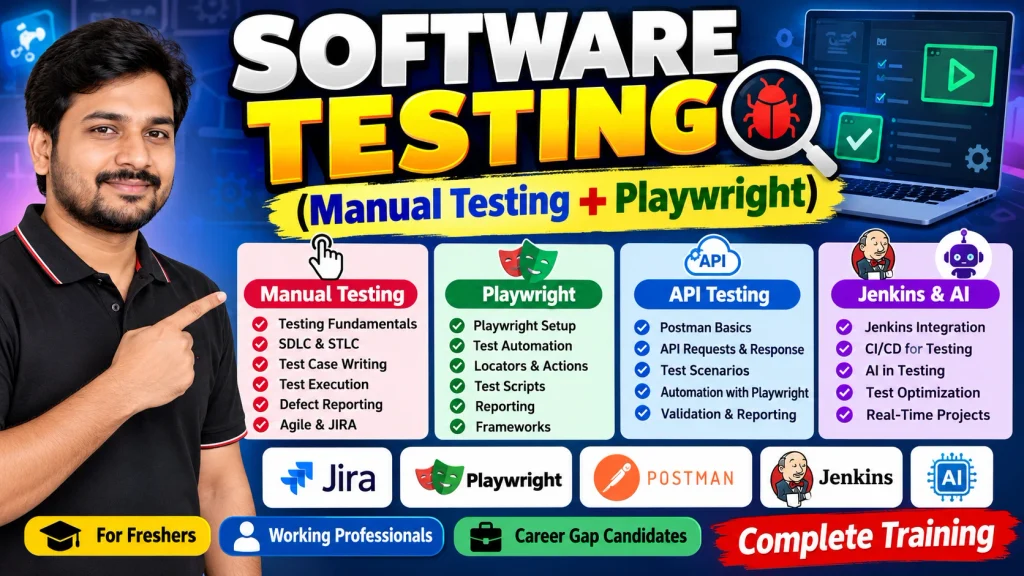
Playwright Course Content
🧪 SOFTWARE TESTING
🎯 (Manual Testing + Playwright)
📝 Manual Testing
📘 About Manual Testing
Manual QA Testing course covers software testing concepts, SDLC, STLC, Agile Testing, Effective Testing methods, QA Process, TestCase writing, TestCase Execution, Defect Reporting,Defect Management and Test Management tools like JIRA.
🎯 Course Objectives
After the successful completion of the Manual Testing course, you
will be able to:
● Learn fundamental concepts in software QA testing, including software testing objectives, processes, test strategies and testing techniques.
● Learn the software QA testing process and manual testing processes like System testing, Re-testing, Regression testing and System Integration Testing and UAT etc.
● Learn to plan a testing projects, design test scenarios, design test cases and data, conduct QA testing operations, manage defects and generate various test reports.
● Learn to conduct Functional Testing, UI Testing, Usability Testing, Load Testing, Performance Testing, Security Testing and Compatibility Testing etc.
● Learn Defect Reporting process and Defect management process.
● Learn implementing Testing Process using tools like JIRA.
👥 Who can join this Course?
Any Fresh Graduates, Students, Working Professionals, and Career Gap candidates who want to learn and gain knowledge in Software Testing can join this course.
📌 Pre-Requisites
No technical and programming knowledge required for this course, minimal knowledge on software applications is enough.
💼 Project Work
Towards the end of the Course, student will learn working on a live project.
🏗️ Software Testing Foundation
📚 Software Testing Concepts
● Introduction to Software Testing
● Why Testing is Necessary
● What is Manual Testing?
● What is Automation Testing?
● Error/Defect/Failure?
● Why Software has defects?
● Cost of fixing defects?
● Verification & Validation
● Role of a Tester?
🔄 Software Development Life Cycle (SDLC)
● SDLC Phases
● SDLC Models
● Waterfall Model
● V Model
● Agile Model
🧭 Software Testing Methodologies
● Static Testing
● Dynamic Testing
🔍 Static Testing Techniques
● What is Static Testing?
● Reviews
● Different Types of Reviews
⚪ White Box Testing
● What is White Box Testing?
● Unit Testing
● Integration Testing
● Why WBT is Necessary?
⚫ Black Box Testing
● What is Black Box Testing?
● Why BBT is Necessary?
● System Testing
● User Acceptance Testing (UAT)
o Alpha Testing
o Beta Testing
🚦 Smoke Testing & Sanity Testing
⚙️ Functional Testing
● Formal Testing
● Ad-hoc Testing
● Re-Testing
● Regression Testing
● System Integration Testing
● End-to-End Testing
● Exploratory Testing
● Monkey Testing
🛡️ Non-Functional Testing
● UI Testing
● Usability Testing
● Security Testing
● Compatibility Testing
● Load Testing
● Performance Testing
● Globalization Testing
● Localization Testing
🧪 Manual Testing with Project Work
🔁 Software Testing Life Cycle (STLC)
● What is STLC?
● STLC Phases
🗓️ Test Planning
● Test Strategy
● Test Plan
🧠 Test Analysis
● Analyzing Functional Requirements SRS/FRS
● Test Design
● Preparing Test Scenarios
● Preparing Test Cases
● Test Case Design Techniques
● ECP & BVA
● Test Data
● RTM
▶️ Test Execution
● Executing Test cases
● Defect Report Template
🐞 Defect /Bug Life Cycle
🛠️ Defect Management
● What is defect?
● Defect Reporting Process
● Defect Severity & Defect Priority
● Defect Status
✅ Test Closure
● Test Summary Reports
🔀 Agile & Jira
● Agile & Scrum
● What is Agile Testing?
● Scrum Introduction
● Getting Agile with Scrum
● Characteristics of Scrum
● Scrum Approach
● Scrum team
🏃 Scrum Project
● Defining Goals
● Scrum Planning
● Define the Product Roadmap
● Release Planning
● Sprint Planning
● Product backlog
● Concept of Epics
● Writing Epics – Examples
● Concept of User Stories
● Writing User Stories- Examples
● Defining Tasks
● Starting Sprint
● Monitoring Sprint status
● Completing Sprint
● The Daily Scrum Meeting
● Sprint Review Meeting
● Sprint Retrospection
🗂️ Test Management & Defect
🧰 Management Tools JIRA
● JIRA Introduction
● How to Install JIRA
● JIRA Features
● Creating Scrum Project in JIRA
● Adding Users to our JIRA Account
● JIRA Issue types
● Workflow for a Project
● Creating Product backlog in JIRA
● Creating EPICS in JIRA
● Creating User Stories in JIRA
● Starting Sprint
● Writing TestCases in JIRA
● Executing TestCases from JIRA
● Adding Bugs to the JIRA Project
● Attaching screenshots of defects in JIRA
🎭 Playwright Cource Content
💻 JavaScript & TypeScript
● JavaScript Fundamentals
● Variables
● Data types
● Operators
● Conditional statements
● Loops
● Functions
● Arrow functions
● Arrays
● Call backs
● Promises
🔷 TypeScript Fundamentals
● Intro to TS and why TS
● Installing and configure TS
● Compiling and run TS
● Typescript types
● Type inference
● Explicit types
● Functions with type annotations
● Enums in Type
● Type assertion
● Array type annotations
● Recap
🤖 Playwright Automation
● Get Started with Playwright
● Setup new project in Playwright
● Understand its architecture
● Cover Key concepts (Context, Page etc)
● Write a basic first test script
● Selectors/Locators
● Learn basic CSS syntax
● Different ways to locate a DOM element (by title, by label, by role etc)
● Write more scripts and perform actions like clicking, typing
● Synchronization/Auto waiting
● Learning assertion using expect library
🔬 Dig Deeper into Playwright
● Understand playwright configuration file
● Headless/Headed mode
● Debugging using pause mechanism
● Deal with list of elements
● Handle iframes
● Shadow DOM
● Alerts
● Keyboard/mouse actions (Click, Right click, context click, Mouse Hover, drag and drop)
● File upload download
● Multiple Tabs/ Windows
🚀 Playwright Advanced Applications
● Reading Data from (.xlsx file, JSON file)
● Test suite structure
● Reporter
● Trace viewer
● Video
● Device emulation
● Code gen (Record & Playback Tools)
● Playwright Inspector
● Visual Testing
🔌 Handling APIs with Playwright
● Why APIs?
● Learn different API methods
● API Request context
● Handling API requests using PW
● Handling API responses using PW
● Network interception
📊 Playwright Test Runner/Reporter
● Role of test runner
● Grouping
● Filtering
● Skipping
● Only keyword
● Test level configuration
● Test Retry
● Overriding config at test level
● Overriding config at project level
● Test Parameterization
● Test Suite
● Test Steps
● Cross browser testing
● Different type of reports
● Global Setup / Tear down
🏛️ Framework Generation for Playwright
● Automation
● Introduction to POM
● Refactor 1 existing script with POM
● Implement Page actions
● Creating Base Page
● Implement common actions methods
● Refactoring Test script with best practice
📈 Report Generation & CI Integration
● HTML and Allure report generation for Playwright automation
● Install & Configure CI/CD using Jenkins
● Integrate the playwright framework with Jenkins
⚙️ Jenkins
● Installing/Configuring Jenkins
● Scheduling Test Execution in Jenkins
● Auto mail configuration in Jenkins
● What is continues integration?
● Continues integration with JENKINS
💼 Live Project Work
● You will actively work on real-time industry projects throughout the learning process to gain hands-on practical experience.
● These projects are designed to simulate actual workplace scenarios, helping you understand real testing workflows.
● You will practice both Manual Testing techniques and Automation Testing using Selenium and Playwright.
● This approach ensures you build job-ready skills and confidence by applying concepts to live project environments.
📮 Postman API Testing
🌐 Understanding of API and Webservices
● What is API
● What is Webservice
● What is CRUD operation
● What are different HTTP Calls GET/POST/PUT/DELETE
Pre-Requisites
● HTTP Status codes
● JSON understanding
📮 POSTMAN
● Introduction
● Installing Postman
● Understanding Postman basic menu / features
● Creating first postman request GET Understanding the response [status code, Message]
● Using parameters in API calls
● Using Headers
● Understanding Authentication and Authorization
● GitHub Example: Using Authentication
● Creating POST PUT and DELETE requests
● Using JSON payloads
● Understanding JSON response
● Environments
● Creating and using Variables
● Create collections and folders
● Collection runner
● Data driving the tests
● Data files
● Initializing test data
● Export and Import collections
● Advanced
● Creating scripted tests in POSTMAN
● Assertions
● Postman console
● Understanding API Documentation
✨ AI in Test Automation
● Introduction to AI in Software Testing
● Understanding Generative AI in Testing
● How AI helps in Test Automation
● AI Tools for Software Testers
● Basics of Prompt Engineering
● Writing effective prompts for testing activities
● Generating test scenarios using AI
● Generating test cases using AI
● Creating test data using AI
● Generating Playwright scripts using AI
● Creating locators with AI assistance
● Converting manual test cases into automation scripts
● Understanding and explaining automation code using AI
● Debugging Playwright scripts with AI assistance
● Improving and optimizing automation scripts using AI
● Generating Page Object Model code using AI
● Creating reusable functions and utilities using AI
● Generating API test scenarios using AI
● Creating sample JSON and API test data using AI
● Analyzing test failures and error messages using AI
● Generating test documentation using AI
● AI-assisted test reporting and analysis
● Best practices for using AI in Test Automation
● Validating and reviewing AI-generated test scripts
● Understanding limitations of AI-generated results
🧠 Introduction to AI Agents
● What are AI Agents?
● AI Agents vs Generative AI
● Basic working of AI Agents
● AI Agents in Software Testing
● How AI Agents can support Test Automation
● AI Agent workflow and basic concepts
● Creating test scenarios with AI Agents
● Generating test data using AI Agents
● Basic test script generation using AI Agents
● AI-assisted test execution concepts
● Basic browser automation with AI Agents
● Understanding AI Agent tools and actions
● Practical AI Agent use cases in Testing
● Limitations and best practices of AI Agents
💡 AI and Prompt Engineering for Testing
● Introduction to AI in Software Testing
● Understanding Generative AI and its role in Testing
● AI Tools for Software Testers
● Basics of Prompt Engineering
● Understanding Prompt Structure
● Writing clear and effective prompts
● Creating prompts for Software Testing activities
● Generating test scenarios using prompts
● Generating test cases using prompts
● Generating positive and negative test cases using prompts
● Creating test data using prompts
● Generating Playwright scripts using prompts
● Generating locators and selectors using prompts
● Converting manual test cases into Playwright scripts
● Creating Page Object Model code using prompts
● Generating reusable functions and utilities
● Debugging automation code using prompts
● Explaining errors and exceptions using prompts
● Improving and optimizing automation scripts
● Generating API test scenarios using prompts
● Creating JSON test data using prompts
● Generating SQL queries for testing requirements
● Analyzing test failures using AI
● Creating test documentation using AI
● Reviewing and validating AI-generated code
● Best practices and limitations of AI in Testing
📝 Practical Prompt Exercises
● Prompt to generate test scenarios from a requirement
● Prompt to generate detailed test cases
● Prompt to create positive and negative test cases
● Prompt to generate boundary and validation test cases
● Prompt to generate Playwright automation scripts
● Prompt to identify suitable Playwright locators
● Prompt to convert Selenium scripts into Playwright scripts
● Prompt to convert manual test cases into automation scripts
● Prompt to create a Page Object Model structure
● Prompt to generate reusable automation methods
● Prompt to debug Playwright errors
● Prompt to improve existing automation code
● Prompt to generate API test cases
● Prompt to create sample API request and response data
● Prompt to generate JSON test data
● Prompt to generate SQL queries for testing
● Prompt to analyze failed test execution results
● Prompt to create test execution summaries
Playwright Training Demo Videos
React AI Engineer React with GenAI training in Hyderabad
React Ai Engineer Class01 in Teleugu
Certifications for Playwright
🎓 Microsoft Playwright Certifications & Courses
Here’s a curated list of certifications and courses for Microsoft Playwright, tailored to different skill levels and career goals:
1. ☁️ LambdaTest Certifications
- 🥇 Playwright 101: Free certification for foundational automation skills, covering setup, selectors, alerts, frames, and cross-browser testing. Includes 40 MCQs and a 36-hour practical assignment.
- 🚀 Playwright 102: Advanced certification focusing on cloud-based testing with HyperExecute. Topics include parallel execution, end-to-end workflows, and integration with CI/CD pipelines7</sup>.
- Exam: 40 MCQs + scenario-based assignment (70% cumulative score required).
- ✨ Key Features: Video tutorials, hands-on browser automation, and certification validity for resume enhancement.
2. 🛡️ EdChart Playwright Testing Certification
- Scope: Validates expertise in end-to-end, API, and performance testing. Covers cross-browser testing, network interception, and CI/CD integration.
- Exam: 30 questions (60% pass rate) with a focus on real-world scenarios.
- 👍 Pros: Global recognition via Credly, ideal for roles like SDET or DevOps Engineer.
- 📚 Topics:
- 📱💻 Mobile/desktop browser testing.
- ⏳ Browser contexts and asynchronous operations.
- 🐞 Debugging with screenshots and video recording.
3. 🏢 Croma Campus Playwright Automation Course
- Content: 40-hour training covering browser automation, test scripting, CI/CD integration, and real-world projects.
- 🏆 Certification Benefits:
- 🧑💼 Prepares for roles like QA Analyst or Automation Lead.
- 💰 Salary range for freshers in India: ₹3–6 LPA.
- 🤝 Job assistance and mock interviews included.
- 🧠 Skills Developed: Problem-solving, time management, and critical thinking.
Job Market for Playwright
💼 Playwright Job Market Analysis (2024)
Here’s an analysis of the job market for Playwright in 2024, including demand trends, roles, salaries, and tips for job seekers:
1. 📈 Growing Demand for Playwright Skills
- ❓ Why Playwright?
- ✅ Companies prioritize cross-browser testing, fast CI/CD pipelines, and reliable automation for modern web apps.
- ✨ Playwright’s speed, reliability, and cloud-native features (vs. Selenium or Cypress) make it a top choice for enterprises like Microsoft, Adobe, and startups.
- 🚀 Adoption Growth: Playwright’s adoption surged by 300%+ since 2022, with 10K+ GitHub stars and 500+ companies using it globally.
2. 🧑💻 Key Roles Hiring Playwright Experts
| Role | Responsibilities | 💰 Avg Salary (US) | 💰 Avg Salary (India) |
|---|---|---|---|
| QA Automation Engineer | Write end-to-end tests, integrate Playwright into CI/CD, debug failures. | $85K–$120K | ₹6–15 LPA |
| SDET | Design test frameworks, optimize parallel execution, and mentor teams. | $100K–$150K | ₹10–25 LPA |
| DevOps Engineer | Scale Playwright tests in cloud environments (AWS/Azure) and manage infrastructure. | $110K–$160K | ₹8–18 LPA |
| Web Scraping Developer | Build data extraction pipelines using Playwright’s automation capabilities. | $70K–$130K | ₹5–12 LPA |
Export to Sheets
3. 🏢 Industries Actively Hiring
- 💻 Tech/Software: SaaS companies, e-commerce giants (e.g., Amazon, Shopify), and fintech firms.
- ⚕️🏦 Healthcare & Banking: Enterprises needing compliance testing for secure web apps.
- 🤝 Consulting & Agencies: Firms offering testing-as-a-service (TaaS) to clients.
4. 🛠️ Top Skills Employers Look For
- Core Playwright Skills:
- 🌐 Cross-browser testing (Chromium, Firefox, WebKit).
- 🔗 API testing, network interception, and 📱 mobile emulation.
- 🐞 Debugging with Trace Viewer and Playwright Inspector.
- Complementary Skills:
- ⚙️ CI/CD tools (GitHub Actions, Jenkins, Azure DevOps).
- ☁️ Cloud platforms (LambdaTest, BrowserStack, AWS).
- 📐 Frameworks like Page Object Model (POM) or 🥒 BDD with Cucumber.
5. 🗺️ Job Market Trends
- 🏠 Remote Work: 60%+ Playwright roles are remote/hybrid, especially in startups and global tech firms.
- 🏅 Certification Advantage: Certifications like LambdaTest Playwright 101 or EdChart Playwright Testing boost resumes.
- Freelance Opportunities: High demand on platforms like Upwork and Toptal for short-term automation projects.
6. 🚀 How to Stand Out
- 📂 Build a Portfolio:
- 💻 Share GitHub projects (e.g., E2E test suites, custom reporters).
- 🌟 Contribute to Playwright’s open-source ecosystem.
- 📜 Certifications: Validate skills with LambdaTest or Udemy Playwright courses.
- 🗣️ Network: Join the Playwright Discord and attend testing conferences (e.g., Testμ).
7. ✨ Future Outlook
- 🔮 Playwright is projected to dominate the test automation market by 2026, surpassing legacy tools like Selenium.
- 🤖🎨 Emerging areas like AI-driven testing and visual regression tools will create niche roles.
📍 Top Job Platforms
- 💼 LinkedIn: Filter roles by “Playwright” or “Test Automation Engineer.”
- 🏢 Indeed/Glassdoor: Search for keywords like “Playwright + Node.js” or “SDET.”
- 🌎 Specialized Boards: We Work Remotely, Stack Overflow Jobs.
🔑 TL;DR: Playwright skills are in high demand globally, with competitive salaries and remote flexibility. Focus on mastering core automation workflows, cloud integrations, and certifications to land roles in tech, healthcare, or consulting. 🚀
Become a Playwright pro in Hyderabad! Learn to automate web applications with this powerful framework. Enroll in our practical training program now.
Register Now for Playwright Training in Hyderabad
Playwright Competitors
*🆚 Playwright’s Top Competitors (2025)
Here’s a detailed overview of Playwright’s top competitors in 2025, based on their features, use cases, and market adoption:
1. 🌐 Selenium
- ✨ Key Features:
- 💻🐍☕ Language Support: Supports Java, Python, C#, Ruby, and JavaScript.
- 🖥️📱 Cross-Browser: Cross-browser testing on Chrome, Firefox, Safari, Edge, and IE.
- ⚙️ CI/CD & Parallel: Integrates with CI/CD pipelines and tools like Selenium Grid for parallel testing.
- 👍 Pros:
- 🫂 Large community and extensive documentation.
- 🛡️ Mature and stable for enterprise-scale projects.
- 👎 Cons:
- 🐌 Slower execution compared to Playwright.
- 🛠️ Complex setup and flaky tests due to manual waits.
- 📊 Market Share: 22.22% (2nd largest in testing tools)
2. 🧪 Cypress
- ✨ Key Features:
- ⚛️ Front-end Focus: Focuses on front-end testing with real-time debugging.
- ⏱️ Advanced Debugging: Automatic waiting, time-travel debugging, and network stubbing.
- 👍 Pros:
- ⚡ Fast execution and easy setup for JavaScript developers.
- ⚛️ Ideal for single-page applications (SPAs).
- 👎 Cons:
- 🌐 محدود Limited Browsers: Limited to Chrome, Edge, and Firefox; no mobile app testing.
- 📈 Adoption: Widely used for modern web apps but lags in cross-browser flexibility compared to Playwright.
3. 🤖 Puppeteer
- ✨ Key Features:
- 👤 Headless Automation: Headless Chrome automation for web scraping, PDF generation, and performance testing.
- ⚙️ DevTools Integration: Direct integration with Chrome DevTools Protocol.
- 👍 Pros:
- 💨 Lightweight and fast for Chromium-based workflows.
- 🛡️ Maintained by Google with strong Node.js support.
- 👎 Cons:
- 🌐 محدود Limited Browsers: Limited browser support (Chrome/Chromium only).
- 📱 Lacks built-in mobile testing capabilities.
4. ⚙️ Testsigma
- ✨ Key Features:
- 🖱️ Low-Code/No-Code: Low-code/no-code platform for web, mobile, API, and desktop testing.
- 🤖 AI-Driven: AI-driven test maintenance and parallel execution on 3,000+ real devices.
- 👍 Pros:
- 🚀 Faster test creation and reduced learning curve.
- 🔗 Integrates with Jira, Jenkins, and Azure DevOps.
- 👎 Cons:
- ✍️ Advanced features (e.g., API testing) may require scripting.
5. 🐞 BugBug
- ✨ Key Features:
- 🖱️ Codeless Testing: Codeless test creation with real-time recording and re-recording.
- 👤 User Simulation: Simulates real user interactions (e.g., cursor movement, smart clicks).
- 👍 Pros:
- ☁️ Cloud-based with unlimited local test runs.
- 🧑💻 Ideal for non-technical teams and rapid test maintenance.
- 👎 Cons:
- 🌐 Limited language support compared to Playwright.
6. 🧠 Keploy
- ✨ Key Features:
- 🤖 AI Test Generation: AI-generated test cases from real user traffic.
- 🔗 API & Integration Focus: Focuses on API and integration testing.
- 👍 Pros:
- 📉 Reduces manual effort in test creation.
- 🎯 Enhances test coverage using AI.
- 👎 Cons:
- 🎨 Less suited for complex UI testing.
🌱 Emerging Tools
- 🤖 Stagehand: An AI-powered successor to Playwright, offering natural-language automation and enhanced durability against bot detection<sup>9</sup>.
- ⚙️ Zoho QEngine: Combines low-code testing with AI-driven features like self-healing tests and geolocation testing.
📊 Market Context
- 📈 Playwright’s Market Share: 1.97% (ranked #7 in testing tools), competing with Selenium (22.22%) and Bugzilla (35.57%).
- 🔑 Key Adoption Drivers: Cross-browser support, parallel execution, and modern web app testing.
📝 Comparison Summary
| Tool | 👍 Best For | 💻 Language Support | 👎 Key Limitation |
|---|---|---|---|
| Selenium | Enterprise-scale testing | Java, Python, C#, etc. | Slow execution, complex setup |
| Cypress | Front-end SPAs & debugging | JavaScript/TypeScript | Limited browser support |
| Puppeteer | Chrome automation & scraping | Node.js | Chrome-only focus |
| Testsigma | Low-code cross-platform testing | Proprietary (NLP) | Steep pricing for advanced features |
Export to Sheets
For teams prioritizing 🌐 cross-browser flexibility, Playwright remains a top choice. However, alternatives like 🧪 Cypress (for front-end focus) or ⚙️ Testsigma (for low-code needs) may better align with specific use cases. Explore 🐞 Zoho QEngine or 🐛 BugBug for codeless solutions, and consider emerging AI tools like 🧠 Keploy or 🌱 Stagehand for future-proofing test workflows.
Playwright Training Use Cases
💡 Playwright Use Cases: Key Applications Across Modern Web Development
Playwright, Microsoft’s open-source automation framework, is widely adopted for its cross-browser support, reliability, and scalability. Below are its primary use cases, synthesized from the search results and industry practices:
1. 🚦 End-to-End (E2E) Testing
Playwright excels at simulating real user workflows to validate application functionality:
- 👤 User Flows: Automate login sequences, checkout processes, or multi-step forms, ensuring UI elements behave as expected.
- 🌐 Cross-Browser Validation: Test scenarios across Chromium, Firefox, and WebKit to ensure consistency.
- 🛡️ Regression Testing: Detect breaking changes after updates using assertions and auto-retries.
- 📱 Mobile Emulation: Test responsive designs on iOS/Android browsers or adjust viewports for mobile-specific interactions.
- Example: 🛒 Automating an e-commerce purchase flow, including cart updates and payment processing.
2. 🖥️📱 Cross-Browser & Cross-Platform Testing
- 💻 Multi-OS Support: Run tests on Windows, Linux, macOS, and cloud-hosted environments.
- ☁️ Parallel Execution: Distribute tests across 50+ cloud browsers (via Microsoft Playwright Testing) to reduce execution time.
- ✅ Consistency: Ensure apps work flawlessly across browsers and OS combinations, including mobile emulation.
- ✨ Feature Highlight: 👤 Browser Contexts: Isolated profiles enable concurrent testing with unique permissions, geolocation, or viewports.
3. 🕸️ Web Scraping & Data Extraction
Playwright’s automation capabilities make it ideal for extracting data from dynamic websites:
- 📜 JavaScript-Rendered Content: Scrape SPAs, infinite scroll pages, or paginated tables.
- 🔑 Authentication Handling: Bypass login barriers or CAPTCHAs by mimicking user interactions.
- 🔗 APIs for Structured Data: Use
page.locator()and network interception to extract and parse data.- Example: 💰 Scraping real-time pricing data from an e-commerce site with dynamic filters.
4. 🎨 Visual Regression & UI Testing
- 📸 Screenshot Comparison: Capture and compare UI snapshots across versions or browsers to detect visual inconsistencies.
- 📹 Video Recording: Debug failures with videos of test runs.
- 🧱 Shadow DOM/Iframe Support: Test web components and nested frames seamlessly.
- Tool Integration: 🐞 Trace Viewer: Analyze DOM snapshots, network logs, and execution traces.
5. ⚙️ CI/CD Pipeline Integration
- ☁️ Cloud Scaling: Use Microsoft Playwright Testing to run tests in parallel on Azure-hosted browsers, bypassing local resource limits.
- 🚀 GitHub Actions/Azure DevOps: Automate test execution on every pull request or deployment.
- 📊 Reporting Dashboards: Generate HTML reports or integrate with Allure for CI-friendly insights.
- Example: ⏱️ Reducing test suite runtime from 30 minutes to 5 minutes using 50 parallel cloud workers.
6. 📡 API Testing & Network Control
- 🚫 Mock Requests: Intercept and modify API responses to simulate edge cases (e.g., slow networks, errors).
- ✔️ Functional Validation: Test REST endpoints using Playwright’s
requestfixture (GET/POST/PUT/DELETE).- Example: 💳 Testing a payment gateway by mocking successful and failed transaction responses.
7. 🤖 Automation of Repetitive Tasks
- 🔄 Routine Workflows: Automate data entry, report generation, or admin panel updates.
- ✍️ Codegen Tool: Generate scripts by recording browser actions, reducing manual coding effort.
- Example: 📅 Scheduling daily inventory updates via automated form submissions.
8. 🧠 AI-Enhanced Testing (Emerging Use Case)
- 🗣️ ZeroStep Integration: Write tests in plain English (e.g., “Click the login button”) using AI to convert instructions into Playwright scripts.
- 🧪 Test-Driven Development (TDD): Define tests before feature implementation using natural language<sup>8</sup>.
- Example: JavaScript
await ai("Calculate the price difference between Wheat and Tomato", { page }); - ⚠️ Limitation: May struggle with highly dynamic UIs.
- Example: JavaScript
🏆 Real-World Adoption
- 🏢 Enterprise Users: Adobe, VS Code, and React Navigation rely on Playwright for cross-browser reliability.
- ⭐ Community Growth: 48k+ GitHub stars and 1.2M+ weekly npm downloads as of 2025.
🛠️ Key Tools & Features
- 🔍 Playwright Inspector: Debug tests step-by-step with live DOM snapshots.
- 📱 Mobile Emulation: Test responsive designs on iPhone, iPad, or Android viewports.
- 🌎 Multi-Language Support: JavaScript, Python, Java, C#.
For implementation guides, explore the Playwright Documentation or Microsoft Playwright Testing.
Playwright Online Training Common Faqs
🛠️ What tools and software will I learn to use?
🚀 Playwright: The core automation framework.
✍️ Code Editor: VS Code is commonly recommended.
🧪 Test Runner: Playwright’s built-in test runner (@playwright/test).
⚙️ CI/CD Tools: Integration with tools like GitHub Actions or Jenkins might be covered.
☁️ Cloud Testing Platforms: Some courses might touch upon platforms like LambdaTest or Playwright Testing Preview.
❓ What topics are typically covered in a Playwright online course?
⚙️ Setup & Installation: Getting your environment ready.
📍 Locators: Identifying web elements.
🖱️ Actions: Simulating user interactions.
✅ Assertions: Verifying expected outcomes.
🌐 Cross-Browser Testing: Running tests on different browsers.
📱 Mobile Testing: Emulating mobile devices.
📡 API Testing: Interacting with backend APIs.
🐞 Debugging: Using Playwright Inspector and Trace Viewer.
📊 Reporting: Generating test reports.
🏛️ Framework Design: Implementing Page Object Model (POM).
⚙️ CI/CD Integration: Automating tests in your development pipeline.
💼 How will a Playwright online course help my career?
🚀 In-Demand Skill: Playwright is a highly sought-after skill in the test automation job market.
🧪 Job Roles: Prepares you for roles like QA Automation Engineer, SDET, and DevOps Engineer.
💰 Salary Potential: Automation skills often lead to higher earning potential.
🛠️ Versatile Tool: Playwright’s wide range of capabilities makes you a valuable asset.
⏱️ How long does a typical Playwright online course take? & COST
Please Contact +919059868766